SimplyActivityCreator Flow
Version 1.0 · March 2026
Overview
The SimplyActivityCreator is a Record-Triggered Salesforce Flow that automatically logs a Salesforce Event on a Contact's Activity timeline whenever a Conversation Output (SimplyRecording__c) record is marked as Complete.
This gives recruiters and CRM users a clear, automatic audit trail of completed AI-generated conversation summaries, directly visible on the candidate's Contact record, without any manual effort.
Purpose
- Automatically create an activity log entry when a Simply conversation summary is completed
- Surface the activity on the related Contact record in the CRM Activity timeline
- Prevent duplicate events using a built-in duplicate check
- Link back to the original Conversation Output record via the Related To field
Prerequisites
Before this flow will work correctly, two things must be configured in your Salesforce org:
1: Allow Activities on the SimplyRecording Object
The SimplyRecording__c object must have Activities enabled so that Events can be linked to it via the WhatId field.
- Go to Setup → Object Manager → SimplyRecording__c → Edit
- Under Optional Features, check Allow Activities
- Click Save
2: Add Activity Related Lists to the Page Layout
This step completes the Allow Activities setup and is required for events to display correctly.
- Go to Setup → Object Manager → SimplyRecording__c → Page Layouts
- Open the active page layout
- Add the Open Activities and Activity History related lists to the layout
- Save
Flow Architecture
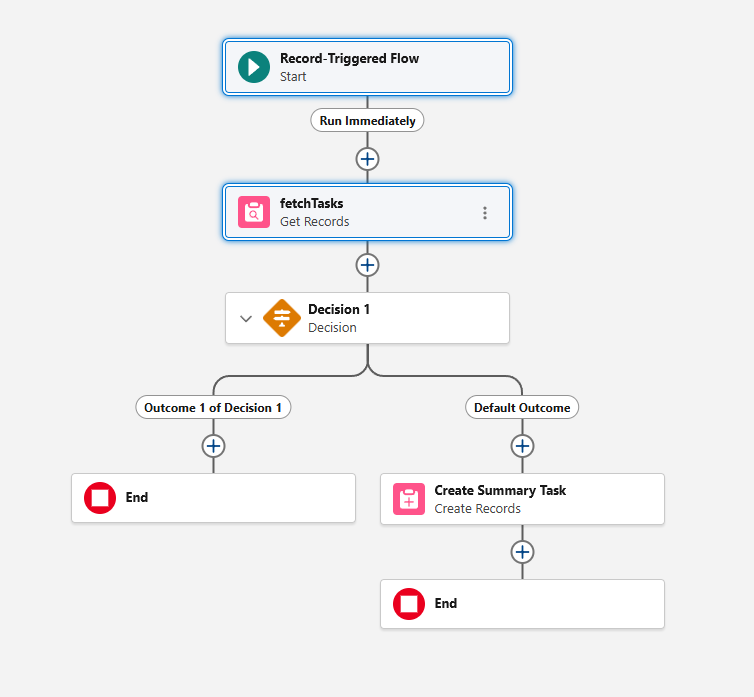
The flow consists of four elements connected in sequence:
| Step | Element | Description |
|---|---|---|
| 1 | Start (Trigger) | Fires when a SimplyRecording__c record is created or updated and Status equals Complete |
| 2 | fetchTasks (Get Records) | Queries existing Events to check if one already exists for this Contact with the same subject |
| 3 | Decision 1 | Routes the flow: if an event already exists, go to End; otherwise proceed to create |
| 4 | Create Summary Task (Create Records) | Creates a new Event record linked to the Contact and the Conversation Output record |
Flow Elements
4.1: Start Node (Configure Start)
The trigger fires on SimplyRecording__c records whenever they are created or updated and meet the Status = Complete condition.
| Field | Value |
|---|---|
| Object | simplyrecruit__SimplyRecording__c |
| Trigger | A record is created or updated |
| Entry Condition Field | simplyrecruit_Status__c |
| Entry Condition | Equals Complete |
| When to Run | Every time a record is updated and meets the condition requirements |
| Optimize For | Actions and Related Records |
The "Every time a record is updated" setting is required here. The Complete status is set by a managed Lightning Component (Simply), not a standard field edit. Using "Only when updated to meet conditions" causes the flow to not trigger in this scenario.
The Start node configuration is visible in the full flow overview below.
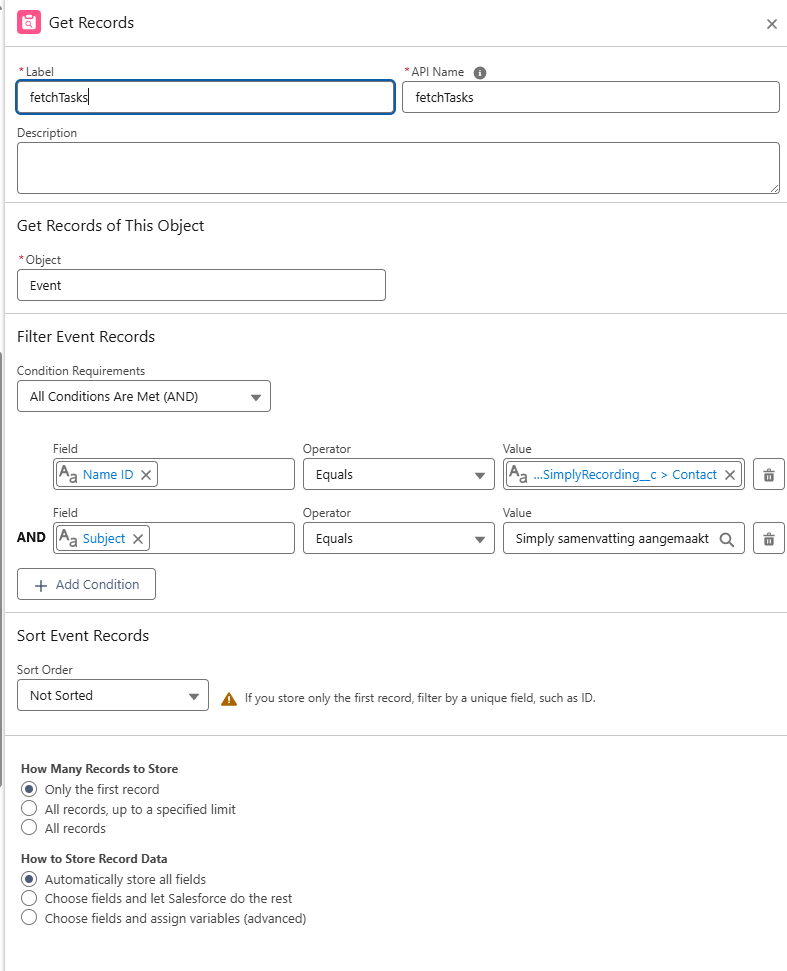
4.2: Get Records (fetchTasks)
Queries for existing Events to prevent duplicate activity entries.
| Field | Value |
|---|---|
| Object | Event |
| Filter 1 - Field | WhoId (Name ID) |
| Filter 1 - Operator | Equals |
| Filter 1 - Value | {!$Record.simplyrecruit__Contact__c} |
| Filter 2 - Field | Subject |
| Filter 2 - Operator | Equals |
| Filter 2 - Value | Simply samenvatting aangemaakt |
| Sort Order | ID Descending |
| How Many Records | Only the first record |
| Store Record Data | Automatically store all fields |
4.3: Decision (Decision 1)
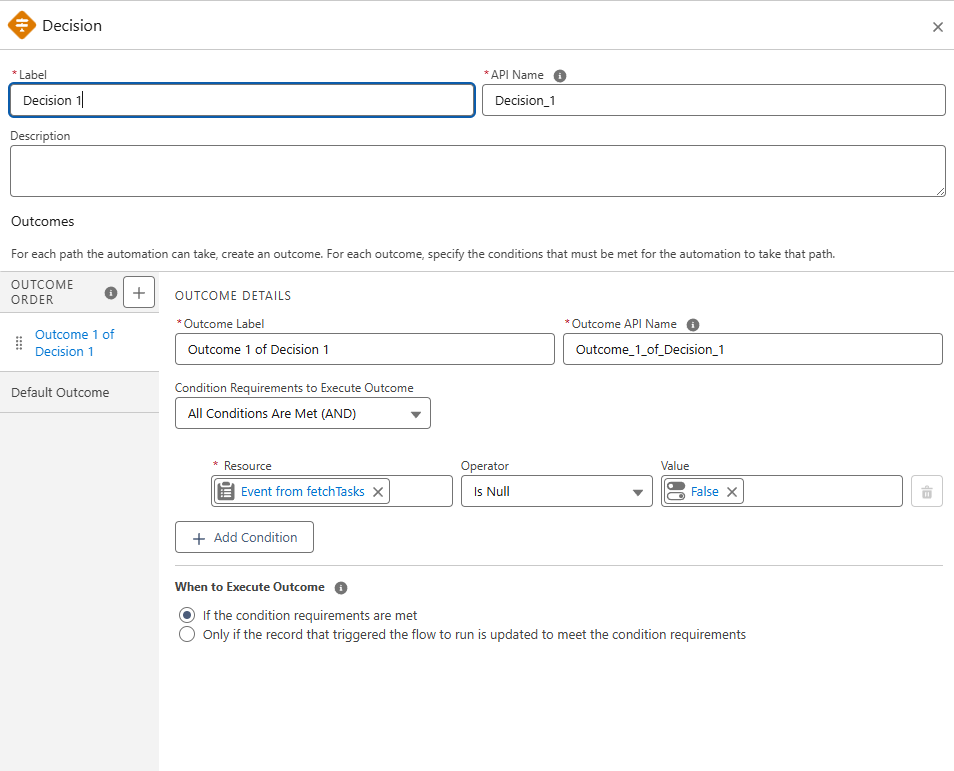
Routes the flow based on whether a duplicate event was found.
| Outcome | Condition | Result |
|---|---|---|
| Outcome 1 (Event exists) | {!fetchTasks} Is Null = False | Event already exists → go to End |
| Default (No event found) | - | Proceed to Create Records |
4.4: Create Records (Create Summary Task)
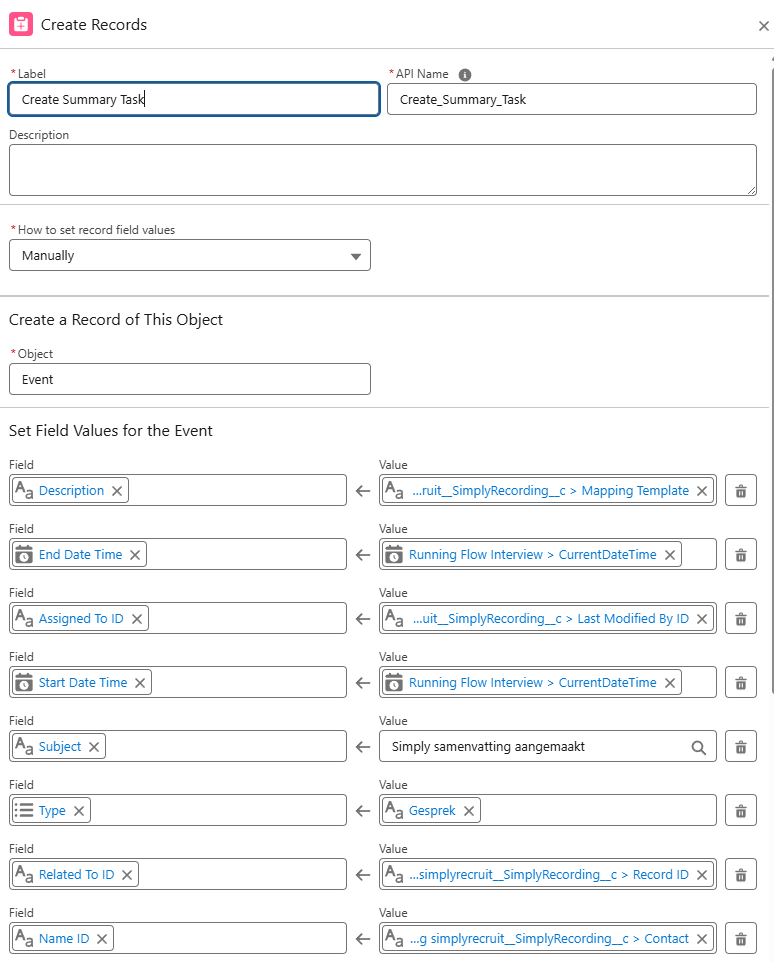
Creates a new Event record linked to both the Contact and the Conversation Output record.
| Field | Value |
|---|---|
| Object | Event |
| Subject | Simply samenvatting aangemaakt |
| Name ID (WhoId) | {!$Record.simplyrecruit__Contact__c} |
| Related To ID (WhatId) | {!$Record.Id} |
| Assigned To ID (OwnerId) | {!$Record.LastModifiedById} |
| Start Date Time | {!$Flow.CurrentDateTime} |
| End Date Time | {!$Flow.CurrentDateTime} |
| Type | Gesprek |
| Description | {!$Record.simplyrecruit__Template__c} |
Setting both WhoId (Contact) and WhatId (Conversation Output) means the event appears in the Contact's Activity timeline AND includes a clickable link back to the original Conversation Output record, giving users full context with one click.
Setting Type = Gesprek renders the phone icon in the Activity timeline, making Simply conversation summaries visually consistent with other call-type activities in the CRM.
Built-in Deduplication (Check for Matching Records)
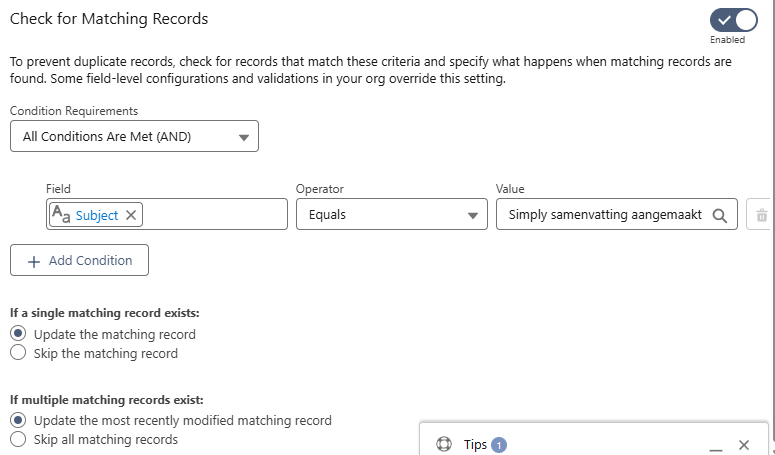
In addition to the fetchTasks query, the Create Records node has Check for Matching Records enabled as a secondary safeguard:
| Field | Value |
|---|---|
| Enabled | Yes |
| Condition Field | Subject |
| Condition Operator | Equals |
| Condition Value | Simply samenvatting aangemaakt |
| If single match exists | Skip the matching record |
| If multiple matches exist | Skip all matching records |
Flow Diagram
Start (SimplyRecording__c created/updated, Status = Complete)
  ↓
fetchTasks (Get Records - Event)
  ↓
Decision 1
  ├── Outcome 1: Event exists (fetchTasks is not null) ──→ End
  ↓  Default: No event found
Create Records (Event)
  ↓
End
Troubleshooting
| Issue | Solution |
|---|---|
| Flow doesn't trigger | Ensure the flow is Active. Check that Status is being set to exactly Complete (case-sensitive). Confirm the Start node uses "Every time a record is updated", not "Only when updated to meet conditions". |
| FIELD_INTEGRITY_EXCEPTION on WhatId | Enable Allow Activities on the SimplyRecording__c object in Object Manager → Edit → Optional Features. |
| Event created but not visible on Contact | Ensure the Lightning Record Page for the Contact has the Activity component added. Also check Activity History (not Open Activities), since the event Status is Completed, it will not appear in Open Activities. |
| Duplicate events being created | Verify that the Subject value in fetchTasks filter exactly matches the Subject set in Create Records (Simply samenvatting aangemaakt). Also verify that Check for Matching Records is enabled on the Create Records node. |
| WhoId is null after creation | Confirm the Contact lookup field API name is simplyrecruit__Contact__c (with __c, not __r). Verify the Conversation Output record has a Contact populated before the flow triggers. |
Testing the Flow
Using Flow Debugger
- Open the flow in Setup → Flows → SimplyActivityCreator
- Click Debug in the top right
- Select a
SimplyRecording__crecord that hasStatus = Complete - Click Run and verify all nodes show green checkmarks
The Flow Debugger always rolls back DML operations. An Event created in debug will not persist to the database. Use real record updates to test actual Event creation.
Real Record Test
- Find a Conversation Output record that does not already have a Simply summary event on the related Contact
- If
Statusis alreadyComplete, change it to another value and save first - Change
Statusback toCompleteand save - Navigate to the related Contact record and check the Activity timeline
- Verify the event appears under the current month with the phone icon
- Confirm via SOQL (in the Developer Console or Workbench):
SELECT Id, Subject, WhoId, WhatId
FROM Event
WHERE Subject = 'Simply samenvatting aangemaakt'
ORDER BY CreatedDate DESC